
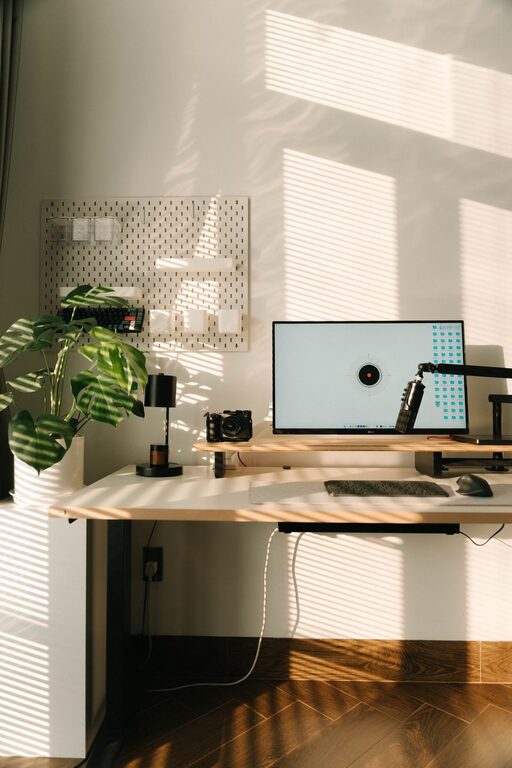
A workspace does not need a complete makeover to feel fresh. A few small changes can make your desk cleaner, more comfortable, and easier to use. The key is to work quickly and focus on the areas that affect you most.
This ten-minute reset is designed for a home office, shared desk, study area, or any place where you work regularly. Set a timer, follow the steps in order, and stop when the ten minutes are over. The goal is not perfection. It is to create a space that feels ready for the next task.
Minute 1: Clear the Main Work Surface
Start by removing everything that does not belong on your desk. Place loose papers, dishes, packaging, and other items in one temporary sorting pile or basket.
Do not spend time deciding where every item belongs yet. The first goal is simply to create clear working space.
Keep only the items you need for your current work, such as:
– Your computer or notebook
– One writing tool
– A drink
– Any materials needed for your next task
A clear surface can make the entire room feel more organized. It also gives you a visible starting point for the rest of the reset.
Minutes 2–3: Sort the Clutter
Now deal with the temporary pile. Sort each item into one of three groups:
- **Keep here:** Items that belong in or near your workspace
- **Move elsewhere:** Items that belong in another room or location
- **Recycle or discard:** Items you no longer need
Use quick decisions. If you are unsure about an item, place it in a “decide later” spot rather than allowing one object to slow down the whole process.
Avoid starting a larger organizing project during this reset. You can create a separate list of tasks for another day, such as sorting old files or organizing a drawer. For now, return misplaced items to their usual locations or place them just outside the workspace to put away later.
Minute 4: Clean the High Touch Areas
Dust, crumbs, and fingerprints can make a workspace feel tired. Use a soft cloth to quickly wipe the areas you touch most often.
Focus on:
– The desk surface
– Keyboard and mouse
– Phone
– Desk lamp switch
– Chair arms
– Frequently used drawer handles
Follow the cleaning instructions for your equipment and avoid putting liquid directly on electronics. A slightly damp cloth is often enough for general surfaces.
You do not need to clean every corner. A quick pass over the most visible and frequently used areas can make a noticeable difference.
Minute 5: Refresh Your Technology
Take a moment to improve your digital workspace. Close tabs and programs you are no longer using, and leave only the tools needed for your next task.
You can also:
– Move downloaded files into the correct folder
– Delete duplicate screenshots
– Close old notifications
– Charge your phone or computer
– Place important files where they are easy to find
A crowded screen can be just as distracting as a crowded desk. A simple digital reset helps your workspace feel calmer without requiring a full file cleanup.
Minutes 6–7: Improve Your Position
Your workspace should support comfortable movement. Adjust your chair, screen, keyboard, and lighting so they fit the way you work.
Check the following:
– Your feet should rest comfortably on the floor or a footrest.
– Your shoulders should feel relaxed rather than raised.
– Your screen should be easy to view without leaning forward.
– Your keyboard and mouse should be close enough to use without reaching.
– Your main light should reduce glare on the screen.
If your setup cannot be adjusted, use simple changes. Place a book under a monitor, move the screen away from a bright window, or shift your chair to a more comfortable position.
Small adjustments can make the next hour feel much better.
Minute 8: Add One Helpful Item
Once the workspace is clear and comfortable, add one item that supports your mood or routine. Choose something useful and simple rather than adding more clutter.
Good options include:
– A small plant
– A notebook for quick notes
– A calendar
– A favorite but practical pen
– A coaster
– A small photo
– A timer
– A water bottle
The item should have a purpose or bring a small sense of enjoyment. One thoughtful addition is usually more effective than filling the desk with decorations.
Minute 9: Prepare for the Next Task
Use this minute to make your next step obvious. Open the document you need, place the correct notebook in front of you, or write down the first action you will take.
Instead of writing a long to-do list, choose one clear starting point. For example:
– “Draft the opening paragraph”
– “Review the first three pages”
– “Answer the two waiting messages”
– “Outline tomorrow’s presentation”
A workspace feels more useful when it is prepared for action. Removing the first bit of friction makes it easier to begin.
Minute 10: Finish With a Simple Reset Rule
Take one final look at the space. Return any remaining items to their places, straighten your chair, and remove anything that could distract you.
Then choose one rule to help maintain the refresh. Keep it easy enough to follow every day.
Simple rules to try
– End each work session with a two-minute tidy.
– Keep only current-task items on the desk.
– Use one basket for items that need to be moved.
– Clear your workspace before starting something new.
– Put supplies back immediately after using them.
– Keep a small recycling bin nearby.
– Do a ten-minute reset at the same time each afternoon.
The best rule is the one that fits naturally into your routine. A short daily reset is easier to maintain than an occasional large cleaning session.
Make the Refresh Work for You
Every workspace has different needs. If you use paper often, focus on organizing documents. If you work mainly on a computer, spend more time clearing your screen and adjusting your equipment. If your space is shared, keep personal items contained in one tray or box so the surface can be cleared quickly.
You can also create different ten-minute versions for different situations:
– Before work: Clear distractions and prepare your first task.
– After work: Put away supplies and reset the surface.
– Before a meeting: Check your background, lighting, and notes.
– At the end of the week: Remove papers and review unfinished tasks.
A workspace refresh is not about creating a perfect office. It is about making the next few minutes easier. In just ten minutes, you can remove distractions, improve comfort, and create a clear path into your next task. Set a timer, start with the surface in front of you, and let small improvements do the work.